Gauhati University 1st Semester Registration 2022: The Students who have been admitted recently to 1st Semester of Gauhati University, can Register and Fill Examination Form. Previously the Online portal was guportal.in. But Now it is onlinegu.in. Here we are going to discuss the application process and other important things here.
1st Semester Registration 2022 in Short
| Event | Gauhati University 1st Semester Registration |
| Name of Class | 1st Semester (CBCS) |
| Stream | Arts, Science and Commerce |
| Education Session | 2022-2023 |
| Application Mode | Online |
| Affiliate University | Gauhati University |
| Official Website | gauhati.ac.in |
1st Semester Registration 2022 Notification
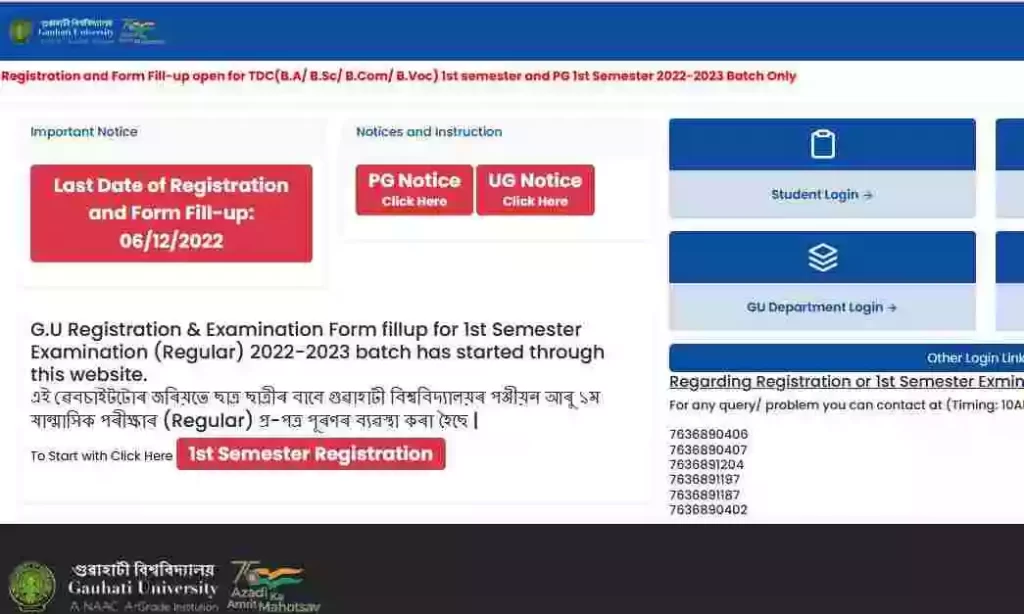
First semester (CBCS) students for session 2022-2023 must complete the Guwahati University registration process. This year, Guwahati University’s online registration process is a bit slow due to the Covid-19 pandemic. Students can complete this registration process from the official website of Guwahati University. Students can follow the steps below as instructions to complete the GU registration process.
- KVS & NVS Recruitment 2025 – Apply Online for 14967 Teaching & Non-Teaching Vacancies
- Water Resources Department Assam Document Verification | SLRC Document Verification 2025
- Directorate of Printing & Stationery Assam Document Verification | SLRC Document Verification 2025
- Directorate of Cultural Affairs Assam Document Verification | SLRC Document Verification 2025
- Office of the Chief Electoral Officer Assam Document Verification | SLRC Document Verification 2025
How to do Gauhati University Registration? 1st Semester Registration 2022
| ১ম পদক্ষেপ: onlinegu.in ৱেবচাইটটোলৈ যাওক [অনুগ্ৰহ কৰি গুগলত সন্ধান (search) নকৰিব, ইণ্টাৰনেট ব্ৰাউজাৰৰ Address Bar ত “onlinegu.in” লিখক] ২য় পদক্ষেপ: “1st Semester Registration” link/button ত ক্লিক কৰক৷ ৩য় পদক্ষেপ: গুৱাহাটী বিশ্ববিদ্যালয়ৰ পঞ্জীয়নৰ বাবে “Create New Login Account”ত ক্লিক কৰি আপোনাৰ নিজৰ একাউন্ট বনাই লওক৷ ৪ৰ্থ পদক্ষেপ: এবাৰ সফলতাৰে একাউণ্ট গঠন হ’লে, “Login to Your Account” Buttonত নাইবা Home pageৰ “Students login” ক্লিক কৰক লগতে ব্যৱহাৰকাৰীৰ নাম (Username) আৰু পাচৱৰ্ড (Password) অন্তৰ্ভুক্ত কৰক৷ ৫ম পদক্ষেপ: এতিয়া “Registration and Form Fill-up”ত ক্লিক কৰক৷ ৬ষ্ঠ পদক্ষেপ: আপোনাৰ “Personal Details” সম্পুৰ্ণ কৰি Save personal detailsত ক্লিক কৰক। ৭ম পদক্ষেপ: “Registration Details” সম্পুৰ্ণ কৰি Save Registration detailsত ক্লিক কৰক। ৮ম পদক্ষেপ: এতিয়া “Educational Details” সম্পুৰ্ণ কৰি Next ত ক্লিক কৰক৷ ৯ম পদক্ষেপ: সকলো প্ৰয়োজনীয় নথি-পত্ৰ Upload (Max File size 500KB)কৰি Next ত ক্লিক কৰক৷ ১০ম পদক্ষেপ: তাৰপিছত প্ৰথম ষান্মাসিক পৰীক্ষাত আপুনি অৱতীৰ্ণ হ’বলগীয়া Paper সমূহ নিৰ্বাচন কৰিবলৈ “Examination Paper Details”ত ক্লিক কৰক৷ Paper সমূহ নিৰ্বাচন কৰোঁতে সাৱধান হওক, যাতে আপুনি ভুল Paper নিৰ্বাচন নকৰে৷ Paper নিৰ্বাচন কৰিবলৈ Add Buttonত ক্লিক কৰক। সম্পূৰ্ণ হ’লে Next Buttonত ক্লিক কৰক। ১১ম পদক্ষেপ: এতিয়া Preview and Submit Buttonত ক্লিক কৰক। নিজৰ Details এবাৰ পৰীক্ষা কৰি লওঁক। যদি শুদ্ধ আছে তেন্তে Submit Buttonত ক্লিক কৰক; অন্যথা ভুল থাকিলে যিটো sectionত ভুলটো আছে, তাত ক্লিক কৰক আৰু শুধৰাই লওক। যদি আটাইখিনি শুদ্ধকৈ আছে পুনৰ Submit কৰক। ১২ম পদক্ষেপ : এতিয়া download button ক্লিক কৰি form খন প্ৰিণ্ট কৰি লওঁক। প্ৰয়োজনীয় মাচুল জমা দি form খনৰ সৈতে মাচুলৰ ৰছিদ বিভাগীয় মুৰব্বী (গুৱাহাটী বিশ্ববিদ্যালয়) অথবা কলেজৰ অধ্যক্ষ/সঞ্চালকৰ ওচৰত জমা দিয়ক । | Step 1: Go to the website onlinegu.in [Please don’t search in google, TYPE “onlinegu.in” in the address bar of the internet browser]. Step 2: Click on 1st Semester Registration link/button. Step 3: Click on Create New Login Account button and create your Account. Step 4: Once Account creation is successful, click on Login to Your Account Button, and then enter user name and password. Step 5: Now click on Registration and Examination Form Fill-up Button. Step 6: Fill up your Personal Details & Click on “Save Personal Details” Step 7: Fill up your Registration Details & Click on “Save Registration Details” Step 8: Fill up your Educational Details & Click on “Next”. Step 9: Upload All Necessary Documents (Each Document should be Maximum of 1 MB Size). After upload click on “Next”. Step 10: Then Click on Examination Papers Details toselect your papers on which you are going to appear your 1st semester examination. To add papers, click on Add Button. Be Careful while selecting the Papers, so that you don’t select wrong papers. After adding the papers Click on “Next”. Step 11: Now click on Preview and Submit Button. The window will display all your information you have filled. If all information is correct then click on “Submit”. If any information is incorrect then go to the particular section and correct it and then click on “Submit”. Step 12: Now click on Download button and print the form. Deposit your fee amount and submit your form along with fee receipt to your department/college along with the copy of the fee receipt. |
Video Tutorial for 1st Semester Registration 2022
Important Documents
- Passport Photo.
- Signature.
- HSLC Admit.
- HS Mark sheet.
Important Dates for 1st Semester Registration 2022
| Starting Date of Registration | 1st December 2022 |
| Last Date of Registration | 6th December 2022 |
Important Links for 1st Semester Registration 2022
| Registration | Click Here |
| Notice | Click Here |
| Download GU Registration | Click Here |
| Admit Download | Click Here |
| Explore Jobs in Assam | Job in Assam |
FAQs-
What is the New website for 1st Semester Registration 2022?
The New Website for 1st Semester Registration is onlinegu.in.